• 39.99
Overall Rating 4.9   147
5
Bought to check for damage caused by a mouse in my RV! It's great to slip into packed spaces and has carried out all the necessary inspections also because the view of the camera is excellent. I also bought it for another camper who didn't know.
22/07/2025
5
This is my first endoscope tool of any type and I am glad to have it. The uses and possibilities are enormous. I got it to use in my remodel/repair work in old houses. Love having the ability to see in some of these walls, BEFORE I cut a big hole in them. I am mostly pleased with this model’s performance, however there are areas for improvement. This whole review is based on many of these factors as well as the price point, the type of device and logical expectations from a camera this small. (Don’t get caught up in star ratings - read the reviews)

First of all, the length and the stiffness of the cable is just right. I can make a bend in the cable and it’ll stay or I can just push through on soft bends within a wall. They smartly designed the short lead cable from the phone to the inline control module to be a little softer and more pliable. I think it helps protect that delicate connection.

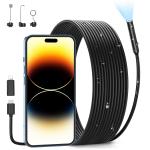
The camera housing is metal. The end ring extends just a bit to protect and shade the lens. The lens ring removes for the application of three (included, metal), screw-on accessories: A magnet; A hook and a 90º mirrored viewer to see to the sides (cool!).

THE APP:

The software is simple to download and operate, it worked right away for me (using an old iPhone 6s). Just as they say, it was plug and play - no issues. The app allows you to shoot still pictures (2mg) and video (1920x1440). Not tremendous resolution, but for the money, I’m okay with it. Within the app, along the top of the screen, there’s a button for minimizing the active screen so you can see the rest of your desktop, while still viewing through the camera. Then a button that rotates the image to fill the full vertical of your screen. Otherwise, the image appears as a horizontal on your vertical phone screen. Turning your phone to go full screen horizontal does nothing. You have to rotate the camera itself in order to make the actual scene adapt to horizontal or vertical. It can be a real trick, but often times it doesn’t matter (for me anyway). There is also a button to change from color to black and white. The last button in the row does a nifty thing in that it presents your last-taken image beside the live view image for making comparisons. It does this by flipping the screen to the horizontal (or long way of the phone), so in this case, you have to flip your phone to the side to see it properly.

At the bottom center of the app you have the large “shutter release” button to take the photo or video. Next to that is a digital zoom button to 2x and on the other side is a button to the Album of shot photos and video. That’s it. The app is very simple. Anyone should be up and running almost instantly once they have the app and the camera plugged in. Plugging the camera into my phone without the app running, opens a dialog box asking to connect with the camera (by opening the app).

You’ll have to allow permission for the app to download any images and video to your phone. Once allowed, it’s a click of a button, while viewing that image, to save that image to your phone. Apparently, there is no way to save a batch of images at this point - perhaps in later versions of the app. You can build a PDF using images from your whole library, not just from the camera’s album. You’ll need to save all your intended endoscope images first before filling out the PDF document. It’d be better if you could select the endoscope album without having to save each image first, but maybe in a later version. Also, there is no repetitive cancel button in the PDF builder. Only one on the first page. Once you get to page 4 or 5 of building your PDF and you want to cancel, you have to go back to page one, to cancel the whole PDF operation. Some more things they can work out along the way, I suppose.

THE CAMERA:

The camera does a pretty nice job in adjusting to the light level of its surroundings. The provided light within the housing is also very effective. It will illuminate, acceptably, a few feet ahead of itself. It’s also dimmable down to an off position using the inline controller. There is also a shutter button on the controller to take a photo or to start and stop a video. The near focus of the camera starts just beyond the attachments. This puts close focus at about 1-1/4 inches. That’s a fair amount of foreground screen space (without attachments in place), that is out of focus, unfortunately. It’s just something to be aware of, I guess. There is no ability to manipulate focus in this version of the camera. The prime distance for sharpness might be about six inches. Beyond that forget it, the quality drops especially in low to no light, so it’s best to get the camera close. Don’t expect to make massive enlargements from these images.

The unit is technically always on, once you plug it in to your phone. Closing the app does not turn it off. You have to unplug the cable from your phone to eliminate any further battery draw. This unit will suck some battery, especially if your using the light at full brightness and shooting video, but that’s all to be expected I suppose. Everyone’s consumption will be different, so it’s difficult to say, since this is my first and only endoscope, how this scope compares to others in battery consumption.

The main drawback for me is that I have to remove my Otterbox phone case in order to get the Lightning adapter to slide all the way in to the phone. Others have said the adapter causes crashes of the app because the connection between the Lightning adapter and the main USB-C connector on the cable is a wiggle spot - I have not found that (yet). With the number of iPhones out there using Lightning connection, you’d think the manufacturer would have a Lightning version, but I’m sure it’s way more complicated and expensive. It’d be nice though - just sayin’. Another thing I wish they would have included, but it wouldn’t have met their price point, is a pouch or case to keep all the components together, not only for protection, but to aid in travel as well.

As I said at the beginning of this review, I am mostly pleased with the performance of this endoscope. I think the manufacturer has done a fine job with this very capable version of a plug and play, economical phone-type endoscope. Despite the mediocre image quality, I’d still recommend it - it’s certainly a worthy effort and can be highly useful.
22/07/2025
4
Very clear picture and video from this endoscope. It comes setup for USB-C, but has adapters for iPhone. The app is simple to use and has options for different viewing angles, lighting, etc. it also has some attachments for retrieving items. The first picture is from a Lego build, the video is the inside of a barrel. I would recommend this if you are looking for a good quality endoscope.
16/07/2025
5
This exceeded my expectations. It was a breeze to download the app. The camera gives a good image and the light is great. Super easy to take a photo or record a video. ( photo of inside my thick plant attached ). This is going to be a lifesaver on several boat projects we have planned. Highly recommended!
16/07/2025
5
A cheap alternative to a dedicated camera and screen. Worth a look. Used it to check land drains. The app works really well - no problems at all.
14/07/2025
5
Setup is super easy on the iPhone -- just plug it in and it pops up with a dialog to install the associated app.

Within the few minutes of opening this I used it to inspect and tighten a problematic hidden bolt under my sink -- using the camera I was able to pick the right socket and guide the tool. I tried to fix before I had this camera with no success, using the endoscope I had it fixed in minutes. Awesome!

The cable seems about the right mix of stiffness and flexibility for most jobs. The software is simple and intuitive.
14/07/2025
5
Did some engine work and it made job easy
11/07/2025
5
Initial setup was dead simple, download the app (Android) and plug in the camera on the USB-C port and I was up and running. The app is pretty basic, but it works fine for the intended use. The additional attachments could be useful in some circumstances, but I never had a need to try them out. My only issue was the camara image couldn't be fully rotated in software. Often, I needed to rotate the physical camera to get the image to display right side up. Since the cable is stiff (which is a good thing) rotating the camera was a bit more challenging.

This product is so useful (and affordable) for looking in tight spaces where you need to see but can't get a camera. I needed to level my stove using the adjustable feet but couldn't see them or the type if tool I could use to adjust it. With this camera I could see clear as day exactly where it was and what type of tool I needed. Since the cable is fairly long, I had no issue positioning it just right. Really solid product. If the app is updated with additional features, it would be even better.
10/07/2025
5
As a low voltage wire installer, precision and efficiency are important in my line of work. Endoscope Cameras have proven to be an indispensable tool, elevating my ability to navigate tight spaces and troubleshoot with unparalleled accuracy. While I have a much more expensive endoscope that includes a portal screen, it is large enough I often don't bring it in gear, and find myself needing it, but don't have it. The portability of this endoscope allows me to leave it in my center console and pair with my phone or someone else after a quick app install. I used the endoscope by fishing through an existing in-wall pilot hole to confirm location on new drill hole. With the included mirror attachment I was able to get the revers view of the pilot hole which is a nice feature my other setup does not have. Image quality is clear, and pairing with the app was simple. I will note that if I connect the endoscope before opening the app, the camera does not pair, however if I attach the endoscope of the app is open, pairing in seamless.
07/07/2025
5
The endoscope is well thought out and the quality of the images delivered is very good, even in dark environments thanks to the integrated lighting. As soon as you connect the camera, a message appears asking you whether you want to download the app. As soon as it loads, the image appears. The camera “hose” is flexible enough, e.g. B. to get into the corners and openings of the vehicle. The app saves images, but can be exported to “Photos”. Alternatively, you can take a screenshot. Completely successful, absolutely attractive price and the Plug&Play motto taken absolutely literally. Full 5 stars.
04/07/2025